
1. What happened in this store?
During a wave of distributed traffic, WO Traffic Guard Pro maintained the effective PROTECT state. Early Guard stopped technical requests before the full PrestaShop bootstrap. The recorded example shows 85.6k requests stopped within one day.
This is an observation from a running environment, not a controlled performance benchmark. This material does not include a comparable run of the same traffic without protection, so we do not claim a CPU reduction percentage or a measured speed gain.
2. Read the dashboard in context
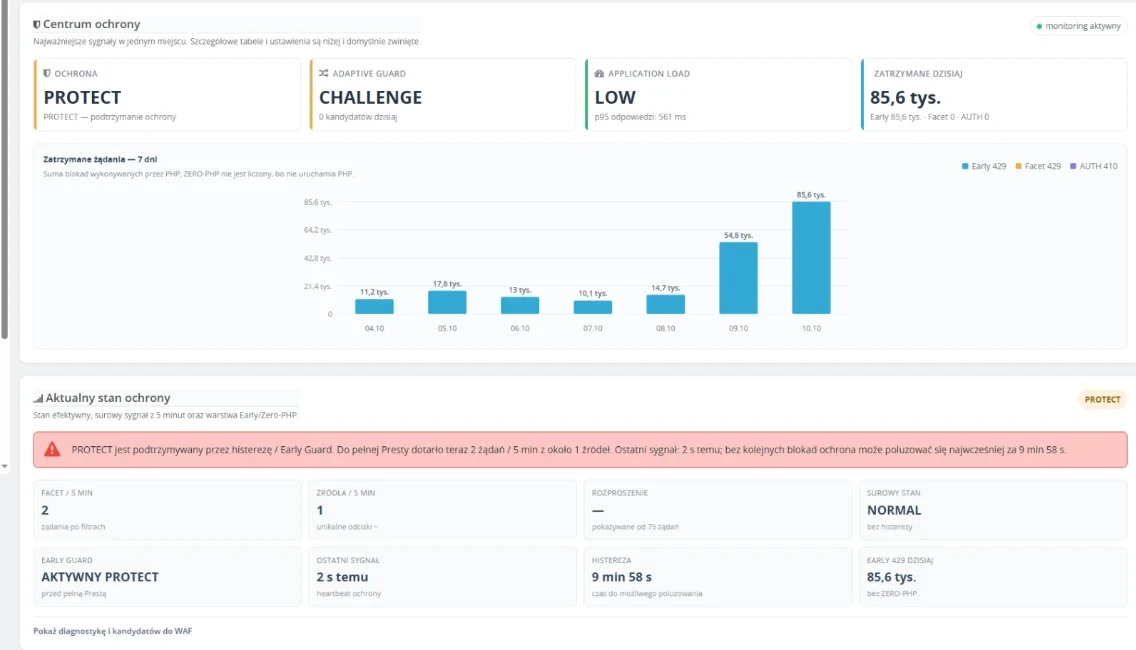
- 85.6k is a daily stopped-request count, not a count of unique bots or customers.
- PROTECT is the effective protection state at the captured moment.
- 2 / 5 min refers to technical requests reaching the full application during a short observation window, not all store visits.
- Application Load: LOW is the module's diagnostic state in this environment.
The daily counter and five-minute window cover different periods. Dividing them does not produce a valid blocking effectiveness rate. Screenshots are from the original Polish installation.
3. What do the hosting charts show?
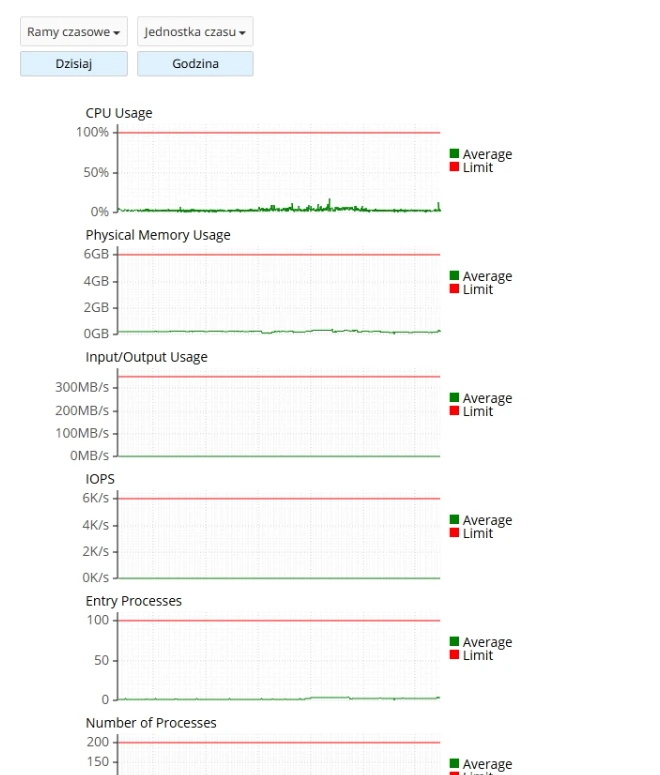
The hosting screenshot shows low resource use during the ongoing traffic wave while protection was active. It complements the dashboard, but one image does not describe the entire day or establish that another store will obtain the same result.
Match timestamps in your own logs and hosting charts. Separately check category, product and cart response times and ordinary shopping journeys. Continued slowdowns also warrant investigation of modules, database queries, cache and background jobs.
4. Test your own store gradually
Start with the SHADOW rollout guide. Prepare a backup and rollback procedure, and check other protection layers: observing one layer does not automatically disable every other layer.
Walk through categories, filters, product pages, cart, sign-in and required integrations. Record the timestamps and compare with diagnostics before choosing active protection settings.
If expensive requests concentrate on category navigation, read the filter and server-load guide.
5. Who can use this example?
Store owners investigating the cost of technical traffic can use this workflow to collect evidence. Traffic Guard Pro does not replace hosting, security updates or network-level volumetric DDoS protection.
Results depend on store version, configuration, installed modules, hosting and traffic patterns. This example does not guarantee a performance level or an increase in sales.